Age Changer - Future Face AI
- 3.9
- Rating
- 50.00K
- Installs
- Free
- Price

 Analysis by App-foxy
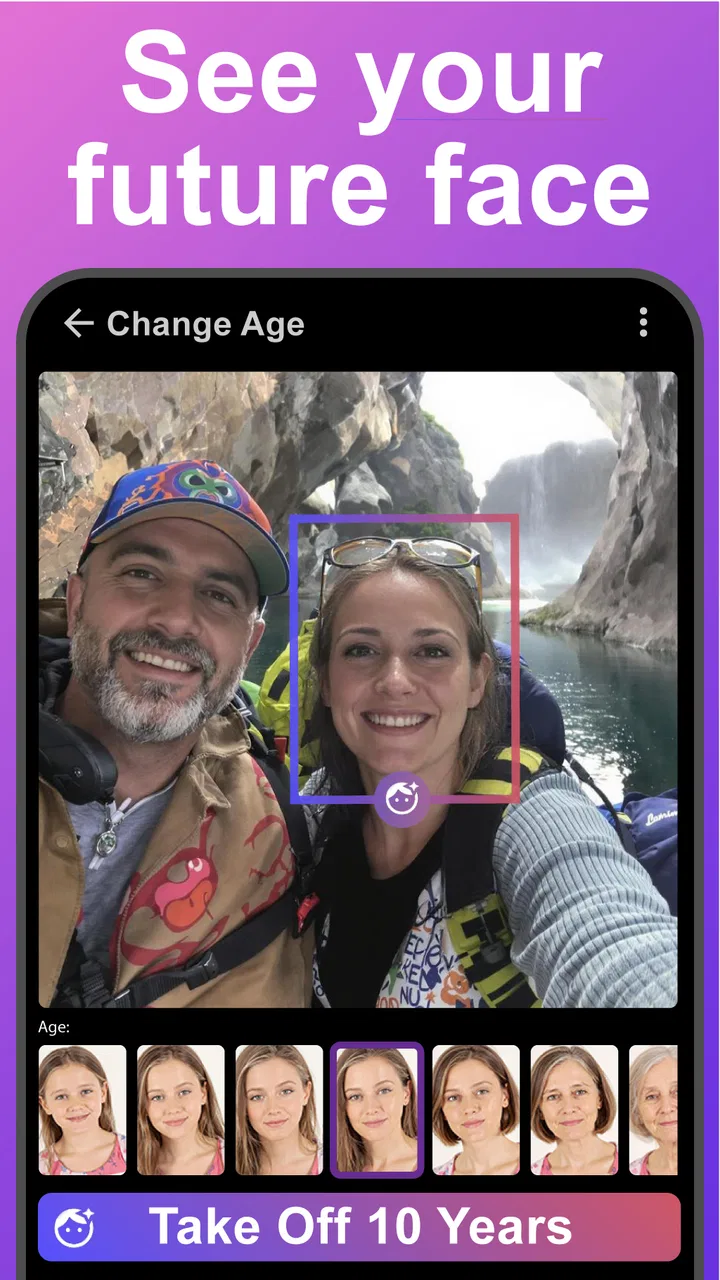
I tried Age Changer - Future Face AI as a beauty app built around one simple idea: use a selfie to preview how a face might look older or younger, then turn that transformation into a more entertaining visual result. It is an immediately understandable concept, but the quality of the experience depends heavily on how realistic, flattering, and usable the generated result feels rather than on the basic promise alone.
The app comes from UpName and is available for free, which makes it easy to test without committing money at the start. Its store short description is simply “Age Changer,” while the longer summary focuses on changing a future-self face from a camera selfie into beautified videos. That gives you a fair idea of the central purpose: this is not a complete beauty editor or a serious facial-analysis tool. I see it more as a quick transformation app for curiosity, jokes, short social posts, and personal experiments.
How the free experience fits the app’s purpose
The most important cost detail is straightforward: the app can be downloaded and used as a free app, but it also includes optional in-app purchases ranging from $0.99 to $99.99 per item. That wide range means I would not assume that every effect, export, or extended use is included in the no-cost experience. The sensible approach is to install it, test the basic workflow, and check the purchase screen carefully before confirming anything.
You May Also Like

 Blood Strike: 2.5 Anniversary
Blood Strike’s Loadouts Turn Every Drop Into a Tactical Gamble
A close look at Blood Strike’s custom loadouts: how fast access to signature weapons reshapes its battle royale rhythm, rewards preparation, and narrows the gap between fights.

 Pandora - Music & Podcasts
Pandora’s Music Is Easy to Start, but Harder to Recover
Pandora’s strength is its low-effort path from a seed to a station. Its weak spot is how much confidence it asks you to place in connection, setup, and quiet recovery.

 8 Ball Pool
 Is Built on Rivalries, Rematches, and Routine
A close look at the rivalries, rematches, shared routines, and unanswered safety questions that turn a quick pool match into a persistent mobile community.

 Samsung Music
’s Quiet Strength Is Playing What You Already Own
Its reach comes less from spectacle than from dependable access to a personal library. That simplicity is both the app’s strongest retention engine and its ceiling.

 AccuWeather: Weather Radar
AccuWeather Review: A Quick, Clear Forecast for Everyday Decisions
For everyday plans, the best forecast is the one you can understand quickly. AccuWeather makes rain timing, radar, and local conditions easy to act on, with a few trade-offs.

 Hill Climb Racing
Why Hill Climb Racing Still Turns Crashes Into One More Run
A tiny car, a bumpy hill and one more upgrade: Hill Climb Racing keeps resurfacing because its simple chaos makes every near-miss feel personal.
More From Our News Desk



For a casual user, free access is valuable because the concept is easy to judge quickly. You do not need to plan a long editing project to find out whether the results appeal to you. Take a suitable selfie, try the age transformation, and decide whether the visual output is good enough for your purpose. If you only want to satisfy curiosity once, that free starting point may be all you need.
Paid value is more difficult to judge in the abstract because the price of each individual item depends on what you choose to unlock. I would treat purchases as optional extras rather than part of the basic promise. In practical terms, the app is worth paying for only if you repeatedly use the transformations, need a particular result, or genuinely enjoy creating videos with them. A single amusing preview does not automatically justify a high-priced purchase.
That distinction matters here. A free app can still be expensive if its most useful output is placed behind repeated purchases, while a paid item can be reasonable when it supports a hobby you return to often. I would avoid buying anything during the first session. Explore the no-cost portion, look at the exact item description, and make sure the result is something you would actually save or share before spending money.
What the app actually contributes
The strongest part of the concept is the immediate visual comparison between your present appearance and an imagined future version. That makes it more engaging than a conventional beauty filter that only smooths skin or changes lighting. The age-focused angle gives you a specific reason to open the app, and the video element adds more life than a single still image when the transformation is convincing.
I found the idea most useful as a social and personal experiment. You can show friends a playful “future me” result, create a before-and-after moment, or compare how different selfies affect the same kind of transformation. It can also work as a lightweight creative prompt: instead of starting with a blank editing screen, you begin with a recognizable face change and build a short visual around it.
One practical insight is that the source selfie matters more than many first-time users expect. A front-facing image with one clearly visible face, even lighting, and a fairly neutral expression gives the transformation less visual confusion to work through. Busy backgrounds, dramatic shadows, sunglasses, extreme angles, or several people in the frame can make the result less useful. I would take a few different selfies rather than judging the app from the first image.
Another useful workflow is to keep the original photo beside the transformed result before deciding whether it is worth sharing. A dramatic effect can look impressive at first glance but become distracting when viewed next to the source. Checking both images helps separate a genuinely readable age transformation from a general distortion or beautification effect.
The video-oriented purpose also changes how I would use it. A short transformation is better suited to a quick message or social post than to a polished personal montage. If you want a carefully edited beauty video with precise control over timing, music, retouching, captions, and transitions, a conventional video editor will probably give you more control. This app’s appeal is speed and novelty, not detailed production work.
Small choices that improve the result
I would start with a well-lit selfie taken at eye level rather than a heavily posed portrait. Soft, even light keeps facial details visible without creating harsh shadows that can be mistaken for age-related changes. I would also avoid applying other beauty effects before the age transformation, because smoothing and reshaping can remove the very details the app needs to create a believable result.
A second tip is to test the same face under different expressions. A neutral image is useful for judging the transformation itself, while a gentle smile may produce a more natural-looking video. An exaggerated expression can be entertaining, but it makes it harder to tell whether the result is changing age or simply reacting to the pose.
There is also a privacy-minded habit worth adopting even without making assumptions about the app’s policies: use only photos you are comfortable processing in a camera-based service, and avoid testing it with someone else’s face without permission. That is particularly important when the image is of a child, a colleague, or a stranger. The Everyone content rating describes the intended age suitability, but it does not turn every possible use of a face image into a good idea.
Finally, save or share only after checking the entire frame. Beauty-oriented transformations can look fine around the face while producing awkward edges elsewhere. A quick review at normal size is more useful than inspecting only the central facial area. This simple check can prevent an amusing experiment from becoming an unintentionally strange post.
Where the tradeoffs become noticeable
The app’s biggest limitation is that an age transformation is inherently interpretive. It is not a prediction of how anyone will actually look in the future, and I would not use the output for medical, psychological, or identity-related conclusions. The result is a stylized visual suggestion. That can be fun, but it also means realism will vary from one selfie to another.
There is a similar tradeoff between beautification and authenticity. The store summary presents the result as a beautified video, which suggests that the app is aiming for an appealing presentation rather than a strictly documentary simulation. If you want a playful, polished effect, that is a strength. If you want an honest view of natural aging, it is a reason to be cautious about interpreting the result.
Another friction point is the relationship between free access and optional purchases. The app is easy to try, but users who want a broader range of results may encounter paid items. Because purchases can extend from a small amount to a much larger amount, I would read each confirmation screen rather than treating every unlock as a minor add-on. The free download is a low-risk invitation to explore, not a guarantee that every desirable result is free.
The app is also not the best fit for people who want manual control. Traditional beauty editors usually let you adjust individual areas, intensity, color, smoothing, and composition. A specialized age-changing app is more convenient when you want an automated transformation, but less satisfying when you want to fine-tune every detail. I would choose a regular editor for controlled retouching and use this one for the age-change idea itself.
Results may also feel repetitive if your interest is limited to one quick comparison. The novelty is strongest when you are experimenting with different expressions, photos, or social situations. If you do not enjoy sharing playful edits or comparing visual variations, the app may have a short lifespan on your phone. That is not necessarily a flaw; it is simply the natural limit of a focused concept.
Who is likely to get real value?
I think the app is best for people who want a fast, low-effort beauty experiment. It suits a friend group looking for a conversation starter, a creator who needs a quick transformation idea, or someone curious about how an age filter handles different portraits. The free entry point makes it reasonable to test for these uses before deciding whether any paid item has enough value.
A realistic everyday scenario would be preparing a playful birthday message. I might take a clean selfie, try a younger and older-looking version, review the video for odd edges, and send the more amusing result privately to friends. In that situation, the app does not need to replace a full editor. It only needs to produce a recognizable transformation quickly, and that is where its focused design makes sense.
It can also be useful for a small creative exercise. For example, I could compare a relaxed selfie with a formal portrait and see which one produces the more expressive video. That comparison teaches me something about the input image and gives me material for a short post without requiring a complicated editing workflow. The key is to treat the output as a creative effect, not as a reliable forecast.
I would recommend skipping it if your main goal is professional beauty work, detailed portrait correction, or dependable visual continuity across a larger project. A photographer, influencer, or editor who needs exact control will likely be happier with a dedicated retouching or video application. I would also skip paid upgrades if you are only mildly curious and have no planned use for the resulting videos.
Parents and younger users should approach the concept thoughtfully even though the app is rated for Everyone. Age transformations can be funny, but children may take appearance changes literally or become overly focused on before-and-after comparisons. I would frame the result as a digital effect and avoid presenting it as a judgment about attractiveness, health, or how a person “should” look.
How it compares with familiar alternatives
Compared with a standard selfie beautifier, this app has a clearer personality. Conventional beauty apps are usually better when the goal is skin smoothing, makeup-style changes, lighting correction, or general portrait polish. Age Changer - Future Face AI is more focused: its reason to exist is the older-or-younger transformation and the resulting video. That focus is useful when you already know what effect you want.
Compared with a general video editor, it is likely to be faster at creating the initial face transformation but weaker at the rest of the production process. A video editor gives you a timeline and broader creative control; this app gives you a specialized starting point. I would use both only when the transformation is the central visual and I want to add finishing touches elsewhere.
Compared with manually editing a portrait, the app is more accessible. You do not need to understand layers, masks, retouching brushes, or color adjustments to get started. The tradeoff is that automation can make choices you would not have made yourself. If the generated result is almost right but not quite, manual editing remains the better route.
The app’s current version is 5.1, and it supports devices running Android 9 or later. That makes compatibility worth checking before installation, especially if you use an older phone. Since camera-based effects and video processing can be demanding, I would also judge the experience on the device you actually plan to use rather than assuming it will feel identical everywhere.
What the public response suggests
The app has an average rating of 3.4 from around one hundred ratings, with a smaller group of written reviews. I read that as a sign to keep expectations measured. There is enough interest for the concept to attract a meaningful audience, but the score does not suggest universal satisfaction. For me, that reinforces the importance of testing several source photos before deciding whether the results are good enough.
It has passed fifty thousand installs, which indicates that the idea has reached beyond a tiny experiment. Still, popularity alone does not answer the questions that matter most: whether your face is handled well, whether the free portion meets your needs, and whether the available output is worth any optional purchase. Those are personal tests, and the app’s quick premise makes them relatively easy to perform.
My recommendation before you spend
I would install it if I wanted a playful age-transformation effect and was comfortable treating the result as entertainment. I would begin with several carefully chosen selfies, compare the outputs at normal size, and try the free experience without rushing into an unlock. If one result is genuinely useful for a message or video, then I would inspect the exact purchase before paying.
I would not install it expecting a scientifically accurate preview of aging, a complete beauty studio, or a professional video-production suite. Those expectations point toward different tools. This app delivers its best value when convenience and novelty matter more than precision, manual control, or long-term editing depth.
My final view is cautiously positive. The focused idea is easy to understand, the free starting point lowers the barrier to experimentation, and the video angle gives the effect more personality than a static filter. At the same time, the middling average rating, variable nature of face transformations, and broad range of optional purchase prices make restraint important. Try the free experience first, judge the actual result on your own photos, and pay only when the output has a clear purpose for you.
FAQs for Age Changer - Future Face AI
01What is Age Changer - Future Face AI and how does it work?
Age Changer - Future Face AI is a photo-editing app designed to simulate how a person might look at different ages. After selecting or taking a portrait, the app uses artificial intelligence to apply an age-related transformation, such as making the face appear younger or older. Results can vary depending on lighting, image quality, facial position, and whether the face is clearly visible.
02Is Age Changer - Future Face AI free to download and use?
The app may be available to download at no initial cost, but some features can be limited behind in-app purchases, subscriptions, advertisements, or premium filters. Before using the age transformation tools extensively, check the current pricing details on the Google Play Store or Apple App Store. Pay close attention to free-trial terms, renewal dates, and cancellation instructions if a subscription is offered.
03Does Age Changer - Future Face AI require an internet connection?
An internet connection may be needed for downloading the app, loading advertisements, accessing premium tools, or processing images through cloud-based artificial intelligence services. Basic features might work offline in some versions, but this should not be assumed. If you plan to use the app while traveling or with limited data, test its main editing functions first and review the app’s latest store description.
04Are photos uploaded to Age Changer - Future Face AI safe and private?
Because the app processes personal photographs, privacy is an important consideration before uploading images. Review its privacy policy and the permissions requested during installation, especially access to photos, the camera, and storage. Avoid uploading sensitive pictures or images of other people without permission. Also check whether photos are processed locally, sent to external servers, retained, or used to improve artificial intelligence systems.
05What kind of photos produce the best results in Age Changer - Future Face AI?
For more convincing transformations, use a clear, front-facing portrait with good lighting and minimal obstruction. Images with sunglasses, heavy shadows, extreme angles, multiple faces, masks, or strong filters may produce inaccurate or distorted results. The app creates an AI interpretation rather than a guaranteed prediction, so facial details, hair, skin texture, and expressions may change in ways that look entertaining but are not scientifically reliable.
Pros
- Creates entertaining age-progression and rejuvenation effects quickly.
- Simple interface makes photo editing accessible to beginners.
- Useful for experimenting with different future-look scenarios.
- Results can be saved and shared on popular social platforms.
- Works well for casual portraits and profile-picture ideas.
Cons
- Realistic results depend heavily on lighting
- pose
- and photo quality.
- Some advanced effects may require a subscription or in-app purchase.
- AI edits can occasionally distort facial features or hair details.
- Privacy policies should be checked before uploading personal photos.
- The app may include ads that interrupt the editing experience.

Age Changer - Future Face AI
Gallery